001-234-567-8910

5th Avenue Madson, NY758, USA

Get Update on our recent Gadgets & Tabs

Tuesday, September 6, 2016

Backup Software for Mobile

Backup Your Mobile

Backup Your Mobile is another basic solution for those who don’t need a lot of features. It can backup a lot of things including apps, system settings, SMS, MMS, call logs, and other various bric-a-brac. The UI is fairly simple and using it to backup stuff should only take a few minutes of poking around. Some have reported that transferring data to a new device and restoring is a little complicated and bugs have been reported sporadically so your mileage may vary. It is free so there’s no harm in trying it out.
Backup your mobile ! android
Mobile Backup

Application can backup and restore: Contacts, SMSes, MMSes, Call logs, System settings, Secure system settings, Wifi passwords, User dictionary, APNs, Calendar events, User applications, Bookmarks and browser history.
Backups are stored on SD card or in device memory, it is also possible to store data on Google Drive, Dropbox or OneDrive (SkyDrive).

It is possible to schedule automatic backups. Application can automatically upload backups to Google Drive, Dropbox or OneDrive (SkyDrive).

It is possible to copy data from one device to another by uploading and downloading backups to/from Google Drive, Dropbox, OneDrive, by moving SD card from one device to another or by copying BackpYourMobile folder between devices.

Important information:
1) After installing the appl please read FAQ (in app menu)

2) In case of any problems after contacts restore please check Contacts Display options.

3) System settings and secure system settings should be restored on the same android version and the same device.
If you restore settings on different android version or different device, some settings will not be restored.

4) APNs visibility depends on mobile network, restored APNs from other mobile network will not be visible in settings.

5) Wifi passwords and secure system settings requires root and are in experimental phase, please send me information do they work on your devices. I suggest take backup with another app.

6) Wifi passwords - before restore on clean system Wifi must be turn on and turn off.

7) Messages send by 'Google Error Report' are anonymous, it is impossible to reply.

Please contact me if you'd like to translate the app to your language.

Detailed functions.
Backup and restore of:
- Contact
- SMS (text message)
- MMS (multimedia message)
- Call log
- Bookmark (stock browser)
- Browser History (stock browser)
- System Setting
- User Dictionary
- APN (Access Point Name) restore don’t work on Android 4.x, neither backup nor restore work on Android 4.2, because Google changed security policy, it is possible to enable experimental workaround for rooted devices in advanced menu.
- Calendar events - events only, calendar must be created by android synchronization
- Secure system settings - restore works on rooted devices only.
- Wifi passwords - works on rooted devices only.
- User applications
- Applications data (root only)

Backups can be encrypted with strong AES 256 encryption method.

Storage backups online (internet) to Google Drive, Dropbox or OneDrive (SkyDrive)

Backup Software for Mac

Carbon Copy Cloner

Carbon Copy Cloner backups are better than ordinary backups. Suppose the unthinkable happens while you're under deadline to finish a project - your Mac is unresponsive and all you hear is an ominous, repetitive clicking noise coming from its hard drive. With ordinary backups, you'll spend your day rushing out to a store to buy a new hard drive and then sit in front of your computer reinstalling the operating system and restoring data.

With Carbon Copy Cloner, your data and the operating system's data are all preserved impeccably on a bootable volume, ready for production at a moment's notice. When disaster strikes, simply boot from your backup and get back to business. Replace the failed hard drive at your convenience, and then restore all of your stuff in one easy step.
Any backup application can save your stuff. A CCC bootable backup will save your productivity as well!
Carbon Copy Cloner ! Backup software for mac
Carbon Copy Cloner


What's new in this version:

If a backup task was configured to back up the startup disk, but the user had excluded system files from the backup task, CCC would avoid recreating startup caches on the destination. CCC logged this uninteresting non-event, but the logging of that event was causing a crash. That crash occurred at the very end of a usually-successful backup task, but resulted in a task history event not being recorded. We fixed that crasher.
CCC 4.1.8 raises a configuration concern if the dest What's new in version 4.1.9
If a backup task was configured to back up the startup disk, but the user had excluded system files from the backup task, CCC would avoid recreating startup caches on the destination. CCC logged this uninteresting non-event, but the logging of that event was causing a crash. That crash occurred at the very end of a usually-successful backup task, but resulted in a task history event not being recorded. We fixed that crasher.
CCC 4.1.8 raises a configuration concern if the destination is a USB device larger than 2TB. This update addresses an issue in which CCC would raise that concern for USB devices larger than 2GB.
CCC will now unmount (with force, if necessary) the Recovery HD associated with the source volume before attempting to create an archive of that volume. This addresses an issue in which various third-party utilities (especially Antivirus software) would dissent an ordinary unmount request, causing the attempt to archive the Recovery HD to fail.
General
Publisher Bombich Software
Publisher web site http://www.bombich.com
Release Date June 21, 2016
Date Added June 21, 2016
Version 4.1.9
Category
Category                    Utilities & Operating Systems
Subcategory              Backup Software
Operating Systems
Operating Systems                Mac OS X 10.10/10.8/10.9
Additional Requirements None
Download Information
File Size 12.38MB
File Name ccc-4.1.9.4365.zip
Popularity
Total Downloads 233,168
Downloads Last Week 195
Pricing
License Model     Free to try
Limitations     30-day trial

Monday, September 5, 2016

Backup Software for Windows

Lazesoft Recovery Suite Home 

Lazesoft Recovery Suite will let you backup important files or your entire hard drive, and then restore from the backup whenever you need. With several different functions bundled together, this app provides a versatile solution to your computer backup needs.
Lazesoft Recovery Suite Home Edition
Free all-in-one data and Windows system recovery tools package/CD/DVD/USB disk, every Windows user should have. Every Windows User should get a Lazesoft Recovery Suite Home Edition, an free instant data and system recovery kit, to ensure protection. With a series of easy-to-use utilities on Lazesoft Recovery Suite Home Edition Recovery CD/boot disk, you can recover your data even if file deleted, partition formatted, you can repair your Windows even if Windows crashed, you can reset your windows login password even if you forgot it. With Lazesoft Recovery Suite Home Edition, just three steps to recover your data, repair Windows system or reset Windows password. It is easy as 1, 2, 3. Create an Free Lazesoft Recovery Suite Recovery CD or USB disk by yourself, then boot PC from it to fix most of computer problems easily and instantly. Main Components of Lazesoft Recovery Suite: Lazesoft Windows Recovery - Windows System Recovery, Fix Windows boot problems Lazesoft Data Recovery - Data Recovery, recover data from deleted, formatted, damaged disk/drive/partition Lazesoft Recover My Password - Windows Password Recovery Lazesoft Disk Image & Clone - Disk Backup, Clone and Partition Manager

Backup Software for Windows
Lazesoft Recovery Suite

What's new in this version:
Version 4.1:
Fixed a bug when building boot disk on Windows 8.1
Pros
Multiple functions: When you open this program, you're presented with a dashboard that offers several options for you to choose from. You can Burn a CD/USB Backup, or you can complete a Windows Recovery, Data Recovery, Disk Image and Clone, or a Password Recovery.

Lots of help: No matter which item you pick, a Wizard will open up in a new window to guide you through the process. And if you need more help than that, you can refer to the Help file, which offers step-by-step instructions complete with screenshots.

Cons
Challenges for novice users: Even with all of the available Help, certain aspects of this program can be overwhelming to novice users. The Disk Image and Clone option in particular require you to make a lot of technical decisions, and there is a lot of information presented at once at each step along the way.

Bottom Line
Lazesoft Recovery Suite Home is a good option for backing up your computer and recovering data if something goes wrong. Although it tries to make all features accessible to all users, some features still require a bit of technical knowledge to take full advantage of. The program is free, however, so it's definitely worth trying out to see if it's a good match for you.

Macrium Reflect Free Edition

 Macrium Reflect Free Edition allows you to back up your entire computer and schedule backups. For a free program, you get incredibly powerful software that allows you to create effective backups.
Macrium Reflect Free Edition. An award winning disk cloning and imaging solution for free. Protect your personal documents, photos, music and e-mails. Upgrade your hard disk or try new operating systems in the safe knowledge that everything is securely saved in an easily recovered backup file. Macrium Reflect supports backup to local, network and USB drives as well as burning to all DVD formats. This version is for non-commercial home use.
What's new in this version:

 Macrium Reflect Free Edition ! Backup software
Macrium Reflect free Edition

Windows 10 DVD/CD rescue media was only able to boot legacy MBR after installing release v6.2.1495. This has been resolved.
This release contains changes to the Macrium Reflect process execution and Service to overcome scheduling problems with the Windows 10 Anniversary Update.
More information can be found on these problems here
The number of Windows Tray Notifications shown when a scheduled backup starts has been reduced.
What's new in version 6.2.1502

  • Windows 10 DVD/CD rescue media was only able to boot legacy MBR after installing release v6.2.1495. This has been resolved.
  • This release contains changes to the Macrium Reflect process execution and Service to overcome scheduling problems with the Windows 10 Anniversary Update.
  • More information can be found on these problems here
  • The number of Windows Tray Notifications shown when a scheduled backup starts has been reduced.
  • Reflect could occasionally 'hang' for many seconds before shutting down. The exit and cleanup functionality has been improved.

When UEFI booting Windows PE rescue media, mounted images could fail to open in PE Explorer. This has been resolved.
General
Publisher Macrium Software
Publisher web site http://www.macrium.com
Release Date August 11, 2016
Date Added August 11, 2016
Version 6.2.1502

Operating Systems
Operating Systems Windows XP/2003/Vista/Server 2008/7/8/10
Additional Requirements None
Download Information
File Size 3.38MB
File Name ReflectDL.exe
Popularity
Total Downloads 5,154,902
Downloads Last Week 1,534
Pricing
License Model Free
Limitations Not available
Price Free


Download Windows 10

Do you want to install Windows 10 on your PC?
Download and run the media creation tool to get started. For more information on how to use the tool, see the instructions below.

Do you want to install Windows 10 on your PC
Window 10
Using the tool to upgrade this PC to Windows 10 (click to show more or less information)
Here’s when to use these instructions:
You bought Windows 10 and are upgrading this PC from Windows 7 or Windows 8.1.
You need to reinstall Windows 10 on a PC on which you’ve already successfully activated Windows 10.
If you are installing Windows 10 on a PC that runs Windows XP or Windows Vista, or if you need to create installation media to install Windows 10 on a different PC, see the section below entitled Using the tool to create installation media (USB flash drive, DVD, or ISO file) to install Windows 10 on a different PC.
Note: Before you install Windows 10, check that your PC meets the system requirements for Windows 10. We also recommend going to the PC manufacturer's website for any additional info about updated drivers and hardware compatibility.
Select Download tool, then select Run. You need to be an administrator to run this tool.
On the Licence terms page, select Accept if you accept the licence terms.
On the What do you want to do? page, select Upgrade this PC now and then select Next.
The tool will start downloading and then installing Windows 10. This table shows which edition of Windows 10 will be installed on your PC. Windows 10 Enterprise isn’t available in the media creation tool. For more info, go to the Volume Licensing Service Centre.

Your Current edition of Window
Window Edition 
The tool will walk you through how to set up Windows 10 on your PC. During setup, you might be asked to enter a product key.
If you bought Windows 10 and are installing it for the first time, you’ll need to enter the Windows 10 product key you received in the confirmation email after your purchase. If you don’t have a product key and you’ve not previously upgraded to Windows 10, select I need to buy a Windows 10 product key.
If you’ve upgraded to Windows 10 on this PC and you’re reinstalling it, you don’t need to enter a product key. Your copy of Windows 10 will activate automatically later, using your digital licence.
When Windows 10 is ready to install, you’ll see a recap of what you’ve chosen and what will be kept during the upgrade. Select Change what to keep to set whether you would like to Keep personal files and apps, or Keep personal files only, or choose to keep Nothing during the upgrade.
Save and close any open apps and files you may be running and, when you’re ready, select Install.
It might take some time to install Windows 10, and your PC will restart a few times. Make sure you don’t turn your PC off.

Using the tool to create installation media (USB flash drive, DVD or ISO file) to install Windows 10 on a different PC (click to show more or less information)
Follow these steps to create installation media (USB flash drive or DVD) that you can use to install a new copy of Windows 10, perform a clean installation or reinstall Windows 10.
Before you download the tool make sure you have:
An internet connection (internet service provider fees may apply).
Sufficient available data storage for the download, on a computer, USB or external drive.
A blank USB flash drive or DVD (and DVD burner) with at least 4 GB of space if you want to create media. We recommend using a blank USB or blank DVD, because any content on it will be deleted.
A Windows 10 product key if you are installing it for the first time or if your PC did not have Windows 10 pre-installed by the PC manufacturer.
Check a few things on the PC where you want to install Windows 10:

  • 64-bit or 32-bit processor (CPU). You’ll create either a 64-bit or 32-bit version of Windows 10. To check this on your PC, go to PC info in PC settings or System in Control Panel, and look for System type.
  • System requirements. Make sure the PC meets the system requirements for Windows 10. We also recommend going to the PC manufacturer's website for additional info about updated drivers and hardware compatibility.
  • Language in Windows. You'll need to choose the same language when you install Windows 10. To see what language you're currently using, go to Time and language in PC settings or Region in Control Panel.
  • Edition of Windows. You should also choose the same edition of Windows. To check which edition you're currently running, go to PC info in PC settings or System in Control Panel and look for Windows edition. Windows 10 Enterprise isn’t available in the media creation tool. For more info, go to the Volume Licensing Service Centre.
  • Microsoft Office products. If you just purchased a new device that includes Office 365, we recommend redeeming (installing) Office before upgrading to Windows 10. To redeem your copy of Office, please see Download and install Office 365 Home, Personal or University on your PC. For more information, check How to upgrade to Windows 10 on new devices that include Office 365.

If you have Office 2010 or earlier and choose to perform a clean install of Windows 10, you will need to locate your Office product key. For tips on locating your product key, check Find your Office 2010 product key or Enter the product key for your Office 2007 program.
Using the tool to create installation media:

  • Select Download tool now and select Run. You need to be an administrator to run this tool.
  • If you agree to the licence terms, select Accept.
  • On the What do you want to do? page, select Create installation media for another PC and then select Next.
  • Select the language, edition, and architecture (64-bit or 32-bit) for Windows 10. This table will help you decide which edition of Windows 10 you’ll choose:
Your current edition of Windows
Window 10 Edition 


Select which media you want to use:

  • USB flash drive. Attach a blank USB flash drive with at least 4 GB of space. Any content on the flash drive will be deleted.
  • ISO file. Save an ISO file to your PC, which you can use to create a DVD. After the file has downloaded, you can go to the location where the file is saved or select Open DVD burner and follow the instructions to burn the file to a DVD. For more info about using an ISO file, see the section below entitled Additional methods for using the ISO file to install Windows 10.

After the installation media is created, follow the steps below to use it.

Using the installation media you created (click to show more or less information)
Before you install Windows 10, it’s a good idea to save any work and back up your PC before you start. If you used the media creation tool to download an ISO file for Windows 10, you’ll need to burn it to a DVD before following these steps.

  • Attach the USB flash drive or insert the DVD into the PC on which you want to install Windows 10.
  • Restart your PC and then press any key to boot from the USB flash drive or the DVD.If you restart your PC and your current version of Windows starts, you might have to open a boot menu or change the boot order in your PC's BIOS or UEFI settings, so that your PC boots from the media. To open a boot menu or change the boot order, you'll typically need to press a combination of keys (such as F2, F12, Delete, or Esc) immediately after you turn on your PC. For instructions on changing the boot order for your PC, check the documentation that came with your PC or go to the manufacturer's website. If changing the boot menu or order doesn't work, try again by signing in to Windows, shutting down and then starting your PC.
  • On the Install Windows page, select your language, time and keyboard preferences, and then select Next.
  • Select Install Windows.


Additional methods for using the ISO file to install Windows 10 (click to show more or less information)
If you downloaded an ISO file for Windows 10, the file is saved locally at the location you selected. If you have a third-party DVD burning program installed on your computer that you would prefer to use to create the installation DVD, you might be able to open that program by going to the location where the file is saved and double-clicking the ISO file. Or, you can right-click the ISO file, select Open with and choose your preferred DVD burning software.
If you want to use the Windows Disk Image Burner to create an installation DVD, go to the location where the ISO file is saved. Right-click the ISO file and select Properties. On the General tab, click Change and select Windows Explorer for the program you would like to use to open ISO files and select Apply. Then right-click the ISO file and select Burn disc image.
If you want to install Windows 10 directly from the ISO file without using a DVD or flash drive, you can do so by mounting the ISO file. This will perform an upgrade of your current operating system to Windows 10.
To mount the ISO file:

  • Go to the location where the ISO file is saved, right-click the ISO file and select Properties.
  • On the General tab, click Change… and select Windows Explorer for the program you would like to use to open ISO files and select Apply.
  • Right-click the ISO file and select Mount.
  • Double-click the ISO file to view the files within it. Double-click setup.exe to start Windows 10 setup.

More download options
Sign in to the Volume Licensing Service Centre to download Enterprise editions.
Sign in to your subscription on the MSDN Portal for MSDN downloads.

Visit the Windows Insider site to download Insider Preview builds
Visit the Download Academic Products page for Education editions (product key required).

Anti-Malware for Mobile

Take your anti-malware protection to go. 
Download for free:
Get On Google Play
Available at Amazon
Powerful, lean protection for your Android device
The people you trust to protect your computer now protect your Android device. Malwarebytes Anti-Malware Mobile guards your identity and personal data on-the-go. So you and your Android smartphone or tablet are safe from malware, infected applications, and unauthorized surveillance. Wherever you are. Whenever you go.

Malwarebytes Anti-Malware for Mobile ! Anti-Malware for Mobile
Anti Malware Mobile


The world’s most popular anti-malware technology has now gone mobile! Malwarebytes Anti-Malware Mobile protects your phone or tablet from malware, infected apps, and unauthorized surveillance.
Malwarebytes Anti-Malware for Mobile ! Anti-Malware for Mobile
Your Device Caption

Features
Anti-Malware/Anti-Spyware
Proactively scans applications and files for malware and spyware
Scans native memory and SD card
Identifies Potentially Unwanted Programs (PUPs) for removal
Scans automatically when files or apps are accessed (real-time) or only when activated manually (on-demand)
Malwarebytes Anti-Malware for Mobile ! Anti-Malware for Mobile
Privacy Audit

Process Automation
Schedules automatic scans
Updates the protection database automatically
Color codes device health issues by severity automatically
Updates over a WiFi network if preferable
Privacy Manager
Identifies every application's access privileges in detail
Breaks down access privileges by category: Contacts, Identity Information, Simple Message Service (SMS), and Security Settings
Security Audit
Identifies security vulnerabilities on the device, suggests remediation
Application Manager
Identifies which applications are currently running
Identifies installed applications
Enables custom whitelisting of approved apps
Changes
Version  2.0.5 / May 3, 2016
Kindle device rotation problem fix
Turkish language support (Türkçe Dil Desteği)
More Memory leak fixes
Lots of Bug fixes

Related Features :- 

Saturday, September 3, 2016

Anti-Malware for Mac

Removes adware and malware. And it’s free.
Malwarebytes Anti-Malware for Mac scans for and removes code that degrades performance or attacks your system. Making your Mac, once again, your Mac.
Download of app updates is now using HTTPS for greater security

Removes adware and malware. And it’s free.
Anti Malware for Mac

Added detection of extensions installed in Chrome or Firefox profiles other than the default profile
Fixed a bug that caused failure of some files to be removed
Fixed a bug that caused files to fail to be detected in rare conditions
Fixed a bug that caused false positives with login items in rare conditions
Fixed a bug that caused incorrect display of some login items in system snapshots
No longer display Apple extensions in the kernel extension list in system snapshots
Fixed bug that prevented self-updating
pecializes in adware removal
Custom-built technology detects and removes adware. Proprietary database identifies over 160 adware variants.
Download Anti-Malware for Mac
Malwarebytes ultra fast scanning
Typically takes only six seconds to complete a scan.

Malwarebytes Anti-Malware for Mac is light and lean
Only the size of two digital music files. That means more disk space for your movies, music, and apps.

Malware removal 
Anti-malware removes malware from your Mac, including Trojans.
Languages Available
English
Hardware Requirements
Core 2 Duo CPU or faster
2 GB RAM
40 MB free hard disk space
800 x 650 minimum screen resolution
Active Internet connection for database and product updates
Software Requirements
Mac OS X 10.8 (or higher)

Anti-Malware 2.0

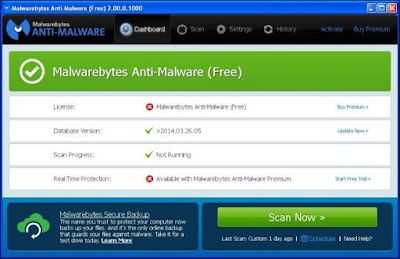
Malwarebytes Anti-Malware 2.0 is a substantial update to the famed malware-killing machine; the latest version integrates rootkit detection directly into the software and sports a more streamlined interface.
From Malwarebytes: Malwarebytes Anti-Malware combines powerful new technologies built to seek out, destroy, and prevent malware infections.
Malwarebytes Anti-Malware is an easy-to-use anti-malware application available in both a Free and Premium version. The Free version is well-known for its detection and removal capabilities, and the Premium version uses advanced protection technologies to proactively stop malware infections. Additionally, Malwarebytes offers a host of extra utilities as well as an approachable forum community to help you combat any piece of malware that exists in the wild.

Anti-Malware 2.0 ! softwarecorner
Anit-Malware 2.0

What's new in this version:
Improvements:
Context Menu scanning option is now enabled by default. Note if you had this option disabled previously and want to retain that setting, you must disable again manually this one time only. Future updates will retain the setting properly
Improved renewal experience for those who purchased in retail store so that the original license key is retained post-renewal instead of requiring that a new key be entered and activated
What's new in version 2.2.1.1043
Improvements:
Context Menu scanning option is now enabled by default. Note if you had this option disabled previously and want to retain that setting, you must disable again manually this one time only. Future updates will retain the setting properly
Improved renewal experience for those who purchased in retail store so that the original license key is retained post-renewal instead of requiring that a new key be entered and activated
Improved End of Trial experience so it is clear that trial has expired and real-time protection is no longer available
Added additional license checks to ensure subscription details are updated as quickly as possible after a renewal is processed
Updated company and product logos with new logo
For Premium subscription licenses, removed Renew button from My Account screen to avoid confusion over license term
Download Anti-Malware 2.0
Issues Fixed:
Fixed security vulnerability to ensure database updates are downloaded over SSL connections only
Fixed crash that occurred if Dell Backup and Recovery software was installed on same system]
Fixed issue where scheduled scan did not honor weekly recurrence properly *Fixed issue where license expiration notices were incorrectly displaying multiple times in rapid succession
Fixed issue where the Scheduler would continue to run in certain cases after a trial had expired
Fixed issue where the update progress bar on the Dashboard would appear to hang and would never complete
General
Publisher Malwarebytes
Publisher web site https://www.malwarebytes.com/
Release Date March 18, 2016
Date Added March 18, 2016
Version 2.2.1.1043
Category
Category Security Software
Subcategory Anti-Spyware
Operating Systems
Operating Systems Windows XP/2003/Vista/Server 2008/7/8
Additional Requirements None
Download Information
File Size 21.79MB
File Name                     mbam-setup-cnet.35891-2.2.1.1043.exe
Popularity
Total Downloads         142,247,048
Downloads Last Week 138,819
Pricing
License            Model Free
Limitations Not available
Price          Free

Related Features :-

Amazon Associate

If you would like to promote your software in this blog plz Contact us. - https://softewarecorner.blogspot.in/p/blog-page.html
Join Our Newsletter